SAS Viya Multi Availability Zone Deployment on Azure
This reference architecture provides an overview of how a Viya environment can be deployed to an Azure AKS cluster with multiple Availability Zones. This is an updated reference architecture to reflect the improved support for deployments across multiple Availability Zones that was added in Viya 2025.10.
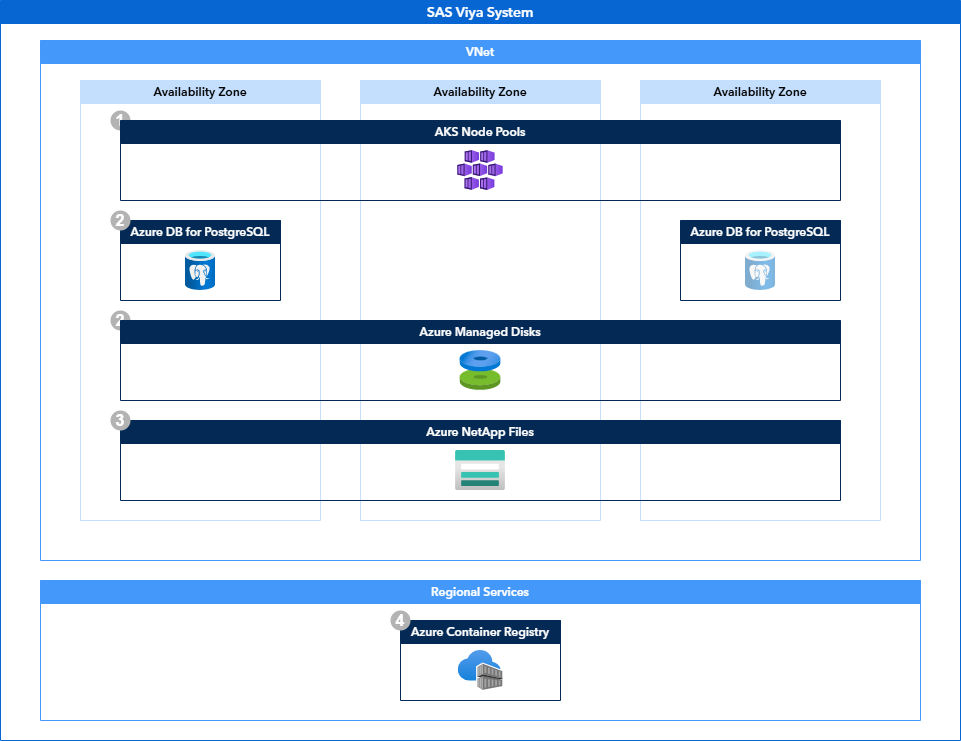
Scenario
The reference architecture for multi Availability Zone deployments in Azure provides the recommended approach to deploy Viya in these environments.
This architecture provides enhanced recovery in case of the following disruptions:
- Single Pod failures: by running multiple instances of all services, the system is protected against pod failures.
- Single Node failures: by spreading multiple instances over multiple nodes, the system is protected against node failures.
- Availability Zone failures: by spreading multiple instances over multiple Availability Zones, the system is protected against Availability Zones failures.
Note that protection against single pod and node failures can also be achieved in single Availability Zone setups.
This reference architecture can be combined with other reference architectures to provide additional resilience in the form of Backup / Restore and Disaster Recovery functionalities.
End-User experience
When an Availability Zone goes down, users will possibly experience a service disruption if their session was running in the affected Availability Zones. After establishing a new session, users can resume working as normal. They should however be aware that:
- Compute sessions will have terminated and any work that was in-progress at the time of the disruption will have to be restarted.
- CAS data will have to be reloaded into memory before it can be used again.
Considerations for cross Availability Zone deployments
Although cross Availability Zone deployments of SAS Viya provide the highest level of availability, this deployment topology does come with a number of caveats:
- Performance Cost: Although cross AZ latency is lower than cross region latency, the increase compared to same zone deployments can have a negative impact on the performance of high performance analytical platforms like SAS Viya.
- Infrastructure Cost: In order to maintain the same level of performance when compared to single AZ deployments, additional infrastructure needs to be deployed that can handle the application load even when an Availability Zone goes down.
If the availability requirements of the Viya environments do not necessitate an active-active multi Availability Zone setup. An active-passive setup may be more performant and cost-effective. The previous version of this reference architecture and the accompanying deployment guide document this scenario.
Solution overview
Assumption
Networking infrastructure has been set up so that end users can reach the SAS Viya platform and the platform can reach its data sources, in all configured Availability Zones.
Components
The following key components make up the reference architecture:
-
AKS Node Pools AKS Node Pools are deployed across at least three Availability Zones to ensure clustered services will always be able to achieve a quorum in case an Availability Zones goes down. All node pools are labeled and tainted according to the SAS documentation. If following the recommended workload placement strategy this means at least 5 node pools will be created:
- Default node pool
- Stateless node pool
- Stateful node pool
- Compute node pool
- CAS node pool
-
Azure DB for PostgreSQL A zone-redundant Azure DB for PostgreSQL database is deployed. In case of an Availability Zone failure, database will automatically failover to a secondary Availability Zone allowing the SAS Viya platform to resume connections with minimal delay.
-
Azure Files Azure Files is deployed with zone-redundant storage. SAS Viya requires both RWO block storage and RWX shared storage. Azure Files provides a resilient RWX shared storage platform. This ensures the SAS Viya platform can still access its storage layer in case of an Availability Zone failure.
-
Azure Disk Storage For RWO block storage, Azure Disks are used. When Azure Disks are provisioned with Zone-redundant storage (ZRS), Azure synchronously replicates your Azure managed disk across three Azure Availability Zones in the region you select. This again ensures the SAS Viya platform can still access its storage layer in case of an Availability Zone failure.
-
Azure Container Registry Although not strictly required, removing the dependency on upstream container image repositories decreases the time in which you are able to create new container instances in a different Availability Zone. Using an Azure Container Registry removes this dependency. The ACR should not only mirror the SAS container registry, but also any other images required to run the supporting services in the ACR cluster such as the Ingress controller and CSI providers.
Additional Resources
Please also have a look at the related resources for this reference architecture: