Running SAS compute sessions with Custom Applications
The Viya platform is an open platform that allows users to interact with it in the way they choose. Whether this is through the SAS Viya web interfaces, IDEs, Open Source libraries or APIs. While a lot of documentation exists around the use of the SAS Viya APIs, it may be difficult to oversee the entire chain of events and related requirements that exist when working with these APIs. This is especially true when using Custom Applications (previously called OAuth clients) to use these APIs.
This document tries to capture the different stages involved in using the Viya APIs specifically to run a compute session and provide the requirements that need to be fulfilled when using these specific parts of the API. For detailed information on all the API endpoints that are available for SAS Viya, please visit SAS Developers
This version of the document focuses on using functionality added in SAS Viya 2026.02 that allows custom applications to run SAS compute sessions. The previous way of working, using dedicated user accounts functioning as service accounts, is still valid and can be found in the previous version of this guide.
Scenario
The goal of this guide is to provide instructions on how to create and configure custom applications to be able to execute SAS compute sessions. Microsoft Entra ID is used as the authentication provider in this guide, although other authentication providers could also be used as long as they are integrated with SAS Viya using OIDC.
The custom application will be mapped to an Entra ID service principal. In the example this is a Managed Identity assigned to an Azure VM.
The figure below illustrates the high-level steps that need to be performed in order to run a SAS compute session using a Managed Identity.
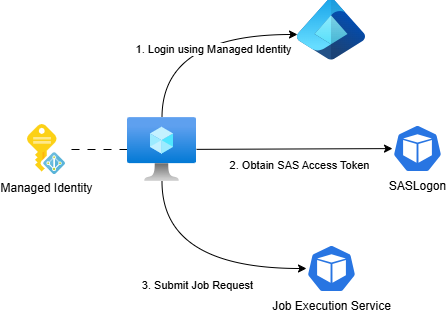
Solution Overview
This implementation guide consists of two sections: Creating a custom application and executing a job.
Creating a custom application
Creation of custom applications is described in the Register a Custom Application section of the SAS Viya Platform Administration guide.
Custom applications can only run SAS compute sessions if they have a registered UID and GID. Creating custom applications with these additional properties is currently not possible using the Viya CLI. We will therefore use the SAS Viya APIs to register a new custom application.
Obtain the authorization token authorized to register clients We first need to obtain an administrative authorization token to be able to register a new application. This token can be obtained in multiple ways. The example uses a username and password combination of a user in the SAS Administrators group.
API Call
The BEARER_TOKEN environment variable should now contain an access token.
Register a new custom application
Next we will register a custom application. The name of the custom application will be set to the object or principal ID of the Managed Identity assigned to the VM. This ID can be retrieved with the following command:
API Call
curl -k -X POST "${INGRESS_URL}/SASLogon/oauth/clients" \
   -H "Content-Type: application/json" \
   -H "Authorization: Bearer $BEARER_TOKEN" \
   -d "{
        \"client_id\": \"${SPID}\",
        \"client_secret\": \"myclientsecret\",
        \"scope\": [\"uaa.none\"],
        \"authorities\": [\"uaa.none\"],
        \"authorized_grant_types\": [\"client_credentials\"],
        \"uid\": \"2001\",
        \"gid\": \"2001\"
    }"
Note that the client_secret that is passed in this API call will not be used. Instead we will add a different authentication method, using JSON Web Tokens, in the next steps. The UID and GID can be chosen freely as long as they do not overlap with existing UIDs and GIDs in your environment.
Validate the custom application has been created successfully
You can validate that the custom application was created successfully using the following API call:
API Call
Obtain an Azure access token from the client VM
An initial access token needs to be obtained through Azure Entra ID. With a Managed Identity assigned to a VM this can be done in the following way when executing the az command-line utility on the VM:
az login --identity --allow-no-subscriptions

AZURE_ACCESS_TOKEN=$(az account get-access-token --query accessToken --output tsv)
Add the client JWT settings to the Custom Application
Next, we will add the client JWT settings to the custom application. This call requires two variables: - The object (principal) ID of the Service Principal we obtained earlier - The tenant ID of the Microsoft Entra ID tenant
The tenant ID can be obtained using the following command:
Note that you can validate that the issuer, subject and audience are correct, by running the following command.
echo "$AZURE_ACCESS_TOKEN" \
  | cut -d '.' -f2 \
  | base64 --decode 2>/dev/null \
  | jq '{iss, sub, aud}'
API Call
curl "$INGRESS_URL/SASLogon/oauth/clients/$SPID/clientjwt" -X PUT \
    -H 'Content-Type: application/json' \
    -H "Authorization: Bearer $BEARER_TOKEN" \
    -H 'Accept: application/json' \
    -d "{
      \"iss\": \"https://sts.windows.net/${TENANT_ID}/\",
      \"sub\": \"${SPID}\",
      \"aud\": \"https://management.core.windows.net/\",
      \"client_id\" : \"${SPID}\"
    }"
This completes setting up the custom application.
Executing a job
Before we can execute a job, we need to obtain an access token for the newly created custom application.
Obtain a SAS access token using the Azure access token
We trade in the Azure access token for a SAS Viya access token.
API Call
SAS_ACCESS_TOKEN=$(curl "$INGRESS_URL/SASLogon/oauth/token" -X POST \
 -H 'Accept: application/json' \
 --data-urlencode "client_id=$SPID" \
 --data-urlencode "client_assertion=$AZURE_ACCESS_TOKEN" \
 --data-urlencode "client_assertion_type=urn:ietf:params:oauth:client-assertion-type:jwt-bearer" \
 --data-urlencode "grant_type=client_credentials" 2> /dev/null | jq -r .access_token)
Create a job definition
With a valid SAS Viya access token, we can now start interacting with the Viya API using the custom application. Start by creating a job definition:
API Call
curl \
  --request POST \
  --url "${INGRESS_URL}/jobDefinitions/definitions" \
  --header 'Accept: application/json, application/vnd.sas.job.definition+json' \
  --header "Authorization: Bearer $SAS_ACCESS_TOKEN" \
  --header 'Content-Type: application/json' \
  --header 'accept: ' \
  --data '{
    "version": 2,
    "name": "Start and Stop CAS",
    "description": "Start and Stop CAS.",
    "type": "Compute",
    "parameters": [
      {
        "version": 1,
        "name": "_contextName",
        "defaultValue": "SAS Job Execution compute context",
        "type": "CHARACTER",
        "label": "Context Name",
        "required": false
      }
    ],
    "code": "cas mysession; cas mysession terminate;"
  }'
API Response
{
    "creationTimeStamp": "2026-02-13T10:21:27.586Z",
    "modifiedTimeStamp": "2026-02-13T10:21:27.590Z",
    "createdBy": "e0e828ac-7671-404e-bf27-d73be492c9a0",
    "modifiedBy": "e0e828ac-7671-404e-bf27-d73be492c9a0",
    "version": 2,
    "id": "7deed4c4-ce4f-4943-9d7a-4f6fe330d465",
    "name": "Start and Stop CAS",
    "description": "Start and Stop CAS.",
    "type": "Compute",
    "parameters": [
        {
            "version": 1,
            "name": "_contextName",
            "defaultValue": "SAS Job Execution compute context",
            "type": "CHARACTER",
            "label": "Context Name",
            "required": false
        }
    ],
    "code": "cas mysession; cas mysession terminate;",
    "links": [
        {
            "method": "GET",
            "rel": "self",
            "href": "/jobDefinitions/definitions/7deed4c4-ce4f-4943-9d7a-4f6fe330d465",
            "uri": "/jobDefinitions/definitions/7deed4c4-ce4f-4943-9d7a-4f6fe330d465",
            "type": "application/vnd.sas.job.definition"
        },
        {
            "method": "GET",
            "rel": "alternate",
            "href": "/jobDefinitions/definitions/7deed4c4-ce4f-4943-9d7a-4f6fe330d465",
            "uri": "/jobDefinitions/definitions/7deed4c4-ce4f-4943-9d7a-4f6fe330d465",
            "type": "application/vnd.sas.summary"
        },
        {
            "method": "PUT",
            "rel": "update",
            "href": "/jobDefinitions/definitions/7deed4c4-ce4f-4943-9d7a-4f6fe330d465",
            "uri": "/jobDefinitions/definitions/7deed4c4-ce4f-4943-9d7a-4f6fe330d465",
            "type": "application/vnd.sas.job.definition",
            "responseType": "application/vnd.sas.job.definition"
        },
        {
            "method": "DELETE",
            "rel": "delete",
            "href": "/jobDefinitions/definitions/7deed4c4-ce4f-4943-9d7a-4f6fe330d465",
            "uri": "/jobDefinitions/definitions/7deed4c4-ce4f-4943-9d7a-4f6fe330d465"
        }
    ]
}
The id field in the response is used in the subsequent job request to reference this job definition. Set it in the JOB_DEFINITION_ID variable.
Create the job request
Next, a job request is created from the job definition.
API Call
curl \
  --request POST \
  --url "${INGRESS_URL}/jobExecution/jobRequests" \
  --header 'Accept: application/json, application/vnd.sas.job.execution.job.request+json, application/vnd.sas.error+json' \
  --header "Authorization: Bearer ${SAS_ACCESS_TOKEN}" \
  --header 'Content-Type: application/json' \
  --data "{
    \"name\": \"Start and Stop CAS\",
    \"description\": \"Start and Stop CAS\",
    \"jobDefinitionUri\": \"/jobDefinitions/definitions/${JOB_DEFINITION_ID}\",
    \"createdByApplication\": \"${SPID}\"
  }"
API Response
{
    "creationTimeStamp": "2026-02-13T10:34:56.814Z",
    "modifiedTimeStamp": "2026-02-13T10:34:56.814Z",
    "createdBy": "e0e828ac-7671-404e-bf27-d73be492c9a0",
    "modifiedBy": "e0e828ac-7671-404e-bf27-d73be492c9a0",
    "version": 3,
    "id": "ac3028f9-fcf7-4e55-a4ec-024f87241110",
    "name": "Start and Stop CAS",
    "description": "Start and Stop CAS",
    "jobDefinitionUri": "/jobDefinitions/definitions/7deed4c4-ce4f-4943-9d7a-4f6fe330d465",
    "arguments": {},
    "properties": [],
    "createdByApplication": "e0e828ac-7671-404e-bf27-d73be492c9a0",
    "links": [
        {
            "method": "GET",
            "rel": "self",
            "href": "/jobExecution/jobRequests/ac3028f9-fcf7-4e55-a4ec-024f87241110",
            "uri": "/jobExecution/jobRequests/ac3028f9-fcf7-4e55-a4ec-024f87241110",
            "type": "application/vnd.sas.job.execution.job.request"
        },
        {
            "method": "GET",
            "rel": "alternate",
            "href": "/jobExecution/jobRequests/ac3028f9-fcf7-4e55-a4ec-024f87241110",
            "uri": "/jobExecution/jobRequests/ac3028f9-fcf7-4e55-a4ec-024f87241110",
            "type": "application/vnd.sas.summary"
        },
        {
            "method": "GET",
            "rel": "export",
            "href": "/jobExecution/jobRequests/ac3028f9-fcf7-4e55-a4ec-024f87241110",
            "uri": "/jobExecution/jobRequests/ac3028f9-fcf7-4e55-a4ec-024f87241110",
            "type": "application/vnd.sas.transfer.object"
        },
        {
            "method": "DELETE",
            "rel": "delete",
            "href": "/jobExecution/jobRequests/ac3028f9-fcf7-4e55-a4ec-024f87241110",
            "uri": "/jobExecution/jobRequests/ac3028f9-fcf7-4e55-a4ec-024f87241110"
        },
        {
            "method": "PUT",
            "rel": "update",
            "href": "/jobExecution/jobRequests/ac3028f9-fcf7-4e55-a4ec-024f87241110",
            "uri": "/jobExecution/jobRequests/ac3028f9-fcf7-4e55-a4ec-024f87241110",
            "type": "application/vnd.sas.job.execution.job.request"
        },
        {
            "method": "PUT",
            "rel": "import",
            "href": "/jobExecution/jobRequests/ac3028f9-fcf7-4e55-a4ec-024f87241110",
            "uri": "/jobExecution/jobRequests/ac3028f9-fcf7-4e55-a4ec-024f87241110",
            "type": "application/vnd.sas.transfer.object",
            "responseType": "application/vnd.sas.summary"
        },
        {
            "method": "GET",
            "rel": "up",
            "href": "/jobExecution/jobRequests",
            "uri": "/jobExecution/jobRequests",
            "type": "application/vnd.sas.collection",
            "itemType": "application/vnd.sas.job.execution.job.request"
        },
        {
            "method": "GET",
            "rel": "jobs",
            "href": "/jobExecution/jobRequests/ac3028f9-fcf7-4e55-a4ec-024f87241110/jobs",
            "uri": "/jobExecution/jobRequests/ac3028f9-fcf7-4e55-a4ec-024f87241110/jobs",
            "type": "application/vnd.sas.collection",
            "itemType": "application/vnd.sas.job.execution.job"
        },
        {
            "method": "POST",
            "rel": "submitJob",
            "href": "/jobExecution/jobRequests/ac3028f9-fcf7-4e55-a4ec-024f87241110/jobs",
            "uri": "/jobExecution/jobRequests/ac3028f9-fcf7-4e55-a4ec-024f87241110/jobs",
            "responseType": "application/vnd.sas.job.execution.job"
        }
    ]
}
We again need to take note of the id returned by API. This is the id we need to provide in our final API call to submit the job request for execution. Save it in the JOB_REQUEST_ID variable.
Submit the job request Finally we can submit the job request
API Call
API Response
{
    "creationTimeStamp": "2026-02-13T10:36:16.867Z",
    "modifiedTimeStamp": "2026-02-13T10:36:16.867Z",
    "createdBy": "e0e828ac-7671-404e-bf27-d73be492c9a0",
    "modifiedBy": "e0e828ac-7671-404e-bf27-d73be492c9a0",
    "version": 4,
    "id": "e994498c-9c11-444b-806e-b55d68698366",
    "jobRequest": {
        "creationTimeStamp": "2026-02-13T10:34:56.814Z",
        "modifiedTimeStamp": "2026-02-13T10:34:56.814Z",
        "createdBy": "e0e828ac-7671-404e-bf27-d73be492c9a0",
        "modifiedBy": "e0e828ac-7671-404e-bf27-d73be492c9a0",
        "version": 3,
        "id": "ac3028f9-fcf7-4e55-a4ec-024f87241110",
        "name": "Start and Stop CAS",
        "description": "Start and Stop CAS",
        "jobDefinitionUri": "/jobDefinitions/definitions/7deed4c4-ce4f-4943-9d7a-4f6fe330d465",
        "jobDefinition": {
            "creationTimeStamp": "2026-02-13T10:21:27.586Z",
            "modifiedTimeStamp": "2026-02-13T10:21:27.590Z",
            "createdBy": "e0e828ac-7671-404e-bf27-d73be492c9a0",
            "modifiedBy": "e0e828ac-7671-404e-bf27-d73be492c9a0",
            "version": 2,
            "id": "7deed4c4-ce4f-4943-9d7a-4f6fe330d465",
            "name": "Start and Stop CAS",
            "description": "Start and Stop CAS.",
            "type": "Compute",
            "parameters": [
                {
                    "version": 1,
                    "name": "_contextName",
                    "defaultValue": "SAS Job Execution compute context",
                    "type": "CHARACTER",
                    "label": "Context Name",
                    "required": false
                }
            ],
            "code": "cas mysession; cas mysession terminate;",
            "links": [
                {
                    "method": "GET",
                    "rel": "self",
                    "href": "/jobDefinitions/definitions/7deed4c4-ce4f-4943-9d7a-4f6fe330d465",
                    "uri": "/jobDefinitions/definitions/7deed4c4-ce4f-4943-9d7a-4f6fe330d465",
                    "type": "application/vnd.sas.job.definition"
                },
                {
                    "method": "GET",
                    "rel": "alternate",
                    "href": "/jobDefinitions/definitions/7deed4c4-ce4f-4943-9d7a-4f6fe330d465",
                    "uri": "/jobDefinitions/definitions/7deed4c4-ce4f-4943-9d7a-4f6fe330d465",
                    "type": "application/vnd.sas.summary"
                },
                {
                    "method": "PUT",
                    "rel": "update",
                    "href": "/jobDefinitions/definitions/7deed4c4-ce4f-4943-9d7a-4f6fe330d465",
                    "uri": "/jobDefinitions/definitions/7deed4c4-ce4f-4943-9d7a-4f6fe330d465",
                    "type": "application/vnd.sas.job.definition",
                    "responseType": "application/vnd.sas.job.definition"
                },
                {
                    "method": "DELETE",
                    "rel": "delete",
                    "href": "/jobDefinitions/definitions/7deed4c4-ce4f-4943-9d7a-4f6fe330d465",
                    "uri": "/jobDefinitions/definitions/7deed4c4-ce4f-4943-9d7a-4f6fe330d465"
                }
            ]
        },
        "arguments": {
            "_contextName": "SAS Job Execution compute context"
        },
        "properties": [],
        "createdByApplication": "e0e828ac-7671-404e-bf27-d73be492c9a0",
        "links": [
            {
                "method": "GET",
                "rel": "self",
                "href": "/jobExecution/jobRequests/ac3028f9-fcf7-4e55-a4ec-024f87241110",
                "uri": "/jobExecution/jobRequests/ac3028f9-fcf7-4e55-a4ec-024f87241110",
                "type": "application/vnd.sas.job.execution.job.request"
            }
        ]
    },
    "state": "running",
    "heartbeatTimeStamp": "2026-02-13T10:36:16.867Z",
    "submittedByApplication": "e0e828ac-7671-404e-bf27-d73be492c9a0",
    "heartbeatInterval": 600,
    "elapsedTime": 17,
    "results": {},
    "links": [
        {
            "method": "GET",
            "rel": "self",
            "href": "/jobExecution/jobs/e994498c-9c11-444b-806e-b55d68698366",
            "uri": "/jobExecution/jobs/e994498c-9c11-444b-806e-b55d68698366",
            "type": "application/vnd.sas.job.execution.job"
        },
        {
            "method": "GET",
            "rel": "state",
            "href": "/jobExecution/jobs/e994498c-9c11-444b-806e-b55d68698366/state",
            "uri": "/jobExecution/jobs/e994498c-9c11-444b-806e-b55d68698366/state",
            "type": "text/plain"
        },
        {
            "method": "PUT",
            "rel": "update",
            "href": "/jobExecution/jobs/e994498c-9c11-444b-806e-b55d68698366",
            "uri": "/jobExecution/jobs/e994498c-9c11-444b-806e-b55d68698366",
            "type": "application/vnd.sas.job.execution.job",
            "responseType": "application/vnd.sas.job.execution.job"
        },
        {
            "method": "DELETE",
            "rel": "delete",
            "href": "/jobExecution/jobs/e994498c-9c11-444b-806e-b55d68698366",
            "uri": "/jobExecution/jobs/e994498c-9c11-444b-806e-b55d68698366"
        },
        {
            "method": "PUT",
            "rel": "updateState",
            "href": "/jobExecution/jobs/e994498c-9c11-444b-806e-b55d68698366/state",
            "uri": "/jobExecution/jobs/e994498c-9c11-444b-806e-b55d68698366/state",
            "type": "text/plain"
        },
        {
            "method": "POST",
            "rel": "updateHeartbeatTimeStamp",
            "href": "/jobExecution/jobs/e994498c-9c11-444b-806e-b55d68698366/heartbeatTimeStamp",
            "uri": "/jobExecution/jobs/e994498c-9c11-444b-806e-b55d68698366/heartbeatTimeStamp",
            "type": "text/plain"
        },
        {
            "method": "GET",
            "rel": "jobRequest",
            "href": "/jobExecution/jobRequests/ac3028f9-fcf7-4e55-a4ec-024f87241110",
            "uri": "/jobExecution/jobRequests/ac3028f9-fcf7-4e55-a4ec-024f87241110",
            "type": "application/vnd.sas.job.execution.job.request"
        },
        {
            "method": "GET",
            "rel": "jobDefinition",
            "href": "/jobDefinitions/definitions/7deed4c4-ce4f-4943-9d7a-4f6fe330d465",
            "uri": "/jobDefinitions/definitions/7deed4c4-ce4f-4943-9d7a-4f6fe330d465",
            "type": "application/vnd.sas.job.definition"
        }
    ]
}